
Main differences between MT4 and MT5
| Criterion | MetaTrader 4 | MetaTrader 5 |
|---|---|---|
| Main idea | A classic platform historically focused on Forex and CFDs. | Multi-asset system with expanded trading, analytical and exchange infrastructure. |
| Accounts and servers | Separate MT4 server system. | Separate MT5 server system; MT4 login usually does not work. |
| Timeframes | 9 standard periods. | 21 standard period. |
| Built-in indicators | 30. | 38. |
| Analytical objects | The official platform page lists 23; a separate technical analysis page lists 24, so the number depends on the classification. | 44 objects according to the official documentation. |
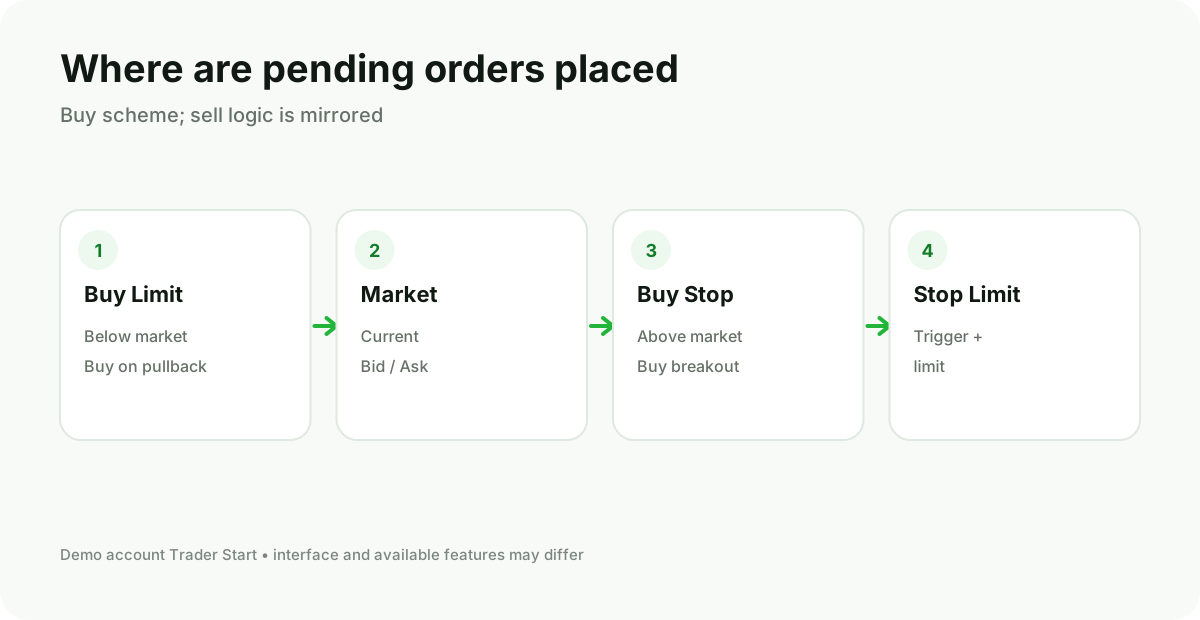
| Pending orders | 4: Buy/Sell Limit and Buy/Sell Stop. | 6: additionally Buy Stop Limit and Sell Stop Limit. |
| Position accounting | Usually separate positions for each ticket. | Supports netting and hedging; the specific mode is set by the broker. |
| Price ladder | Is not a core central function of the platform. | Depth of Market is provided, but the data depth depends on the broker and the market. |
| Economic calendar | There is no comparable built-in system calendar. | Built into the terminal's ecosystem. |
| Programming language | MQL4. | MQL5. |
| Strategy Tester | Classic tester, primarily for a single instrument. | Advanced multithreaded tester, optimization and testing of multiple instruments. |
| Code compatibility | MQ4/EX4. | MQ5/EX5; porting MQL4 usually requires rework. |
| Web and Mobile | Available if supported by the broker. | Available if supported by the broker. |
Markets: platform name does not guarantee instruments
MT5 is technically better suited for multi‑asset and exchange trading, but that does not mean that any MT5 broker automatically offers stocks or futures. Conversely, an MT4 broker may provide a large number of CFDs. Always check the symbol list for the specific account.
You need to compare the chain broker → legal entity → account type → platform → symbol. For a single brand, MT4 and MT5 may have different sets of contracts, commissions, and trading sessions.
Orders and position accounting
For standard manual trading, both platforms allow buying and selling at market, creating Limit and Stop orders, and setting S/L and T/P. MT5 adds Stop Limit and supports two position accounting models.
In netting, an opposite trade reduces or flips the net position. In hedging, a new trade can create a separate position. If a strategy requires holding both BUY and SELL on the same symbol simultaneously, verify the account mode before registration.
Charts and analysis
MT5 offers more built‑in timeframes, indicators and analytical objects. This is convenient for non‑standard timeframes such as M2, M3, M10, H2 and others. In MT4 many traders compensate the limitations with custom indicators or external charts.
But the number of tools does not replace the trading process. If a working system uses one or two timeframes and a few indicators, the difference may be less important than terminal stability and habit.
MQL4 vs MQL5
An MT4 Expert Advisor cannot be considered compatible with MT5. The languages look similar on the surface, but the trade operation models, events, libraries and APIs differ. To port it you need the source code, a developer and new testing.
| Task | MT4 | MT5 |
|---|---|---|
| Advisor | Expert Advisor in MQL4. | Expert Advisor in MQL5. |
| Indicator | MQ4/EX4. | MQ5/EX5. |
| Editor | MetaEditor for MQL4. | MetaEditor for MQL5. |
| Testing | Classic Strategy Tester. | Advanced tester and optimization, including distributed computing within the ecosystem. |
| Porting | Renaming the file does not work; logic adaptation and re‑verification are required. | |
Is it possible to use a single account on both platforms
Generally, no. MT4 and MT5 accounts are created on different servers. Even with the same broker you will need a separate account type, login, and server. The balance is not transferred between them automatically via the terminal: a transfer, if available, is performed through the broker’s client portal.
Speed and execution
It cannot be claimed that a trade will be executed better just because the platform is called MT5. The actual result is affected by the broker's server, liquidity, execution route, the user’s or VPS location, network, symbol type, and market conditions. MT5 has a more modern architecture and tester, but the quality of a specific execution is verified via the account and logs.
When to choose MT5
- The broker provides the needed markets in MT5, and there is no reliance on the old MQL4 programs.
- Additional timeframes and Stop Limit are needed.
- Netting, Depth of Market, or a broader exchange architecture are important.
- The development of new systems in MQL5 is planned.
- A more powerful tester and multithreaded optimization are needed.
When to choose MT4
- The required broker account or symbol is available only in MT4.
- There is a critically important, proven MQL4 expert advisor or indicator.
- The entire workflow is built around specific MT4 templates and tools.
- You understand that migration will require time and retesting.
Mistakes when selecting
- Choosing a program based on advertising without checking the account's instruments and commissions
- Buying an MQL4 expert advisor assuming it will run on MT5
- Assuming that the login of one terminal will automatically open in another
- Compare only the appearance, ignoring the position mode and specifications.
- Open a live account before testing the demo server and mobile version.
- Switch to MT5 without source code and a migration plan for legacy programs.
Selection algorithm in five minutes
- Record the required markets and specific symbols.
- Check on which broker account they are available.
- Clarify netting/hedging, commissions and execution mode.
- Create a list of mandatory indicators and expert advisors.
- Check for the availability of a version for MQL4 or MQL5.
- Open demo accounts on both platforms and execute the same trade scenario.
- Compare the log, mobile app, and ease of daily operation.
Tickmill, IC Markets, and FP Trading support MT4 and MT5.
This allows comparing both systems across three brokers. However, the list of markets and terms may differ between platforms, account types, regions, and legal entities.
Check product availability and terms before opening an account.
Frequently Asked Questions
Does MT5 fully replace MT4?
Technically, MT5 expands many capabilities, but the account and software ecosystems differ. Users with critical MQL4 tools continue to choose MT4.
Where are there more instruments?
That is determined by the broker and the account type. MT5 is technically designed for a broader range of markets, but the specific list must be checked on the server.
Is it possible to open the same trade in MT4 and MT5?
The mechanics of a market order are similar, but symbols, specifications, prices, and accounting mode may differ.
What is better for Expert Advisors?
For an existing ready-made MQL4 Expert Advisor you need MT4. For new development, MT5 offers a more modern language and an advanced tester. The final choice depends on the code and the task.
Do you have to pay for the platform?
Client terminals are usually provided for free. You pay the broker's trading costs and possibly for third-party software, data, or VPS.